
Play USpin on mobile in your browser
Play at USpin on mobile and desktop in your browser: slots, live casino and sports in one account, with 24/7 live chat. Adults only.
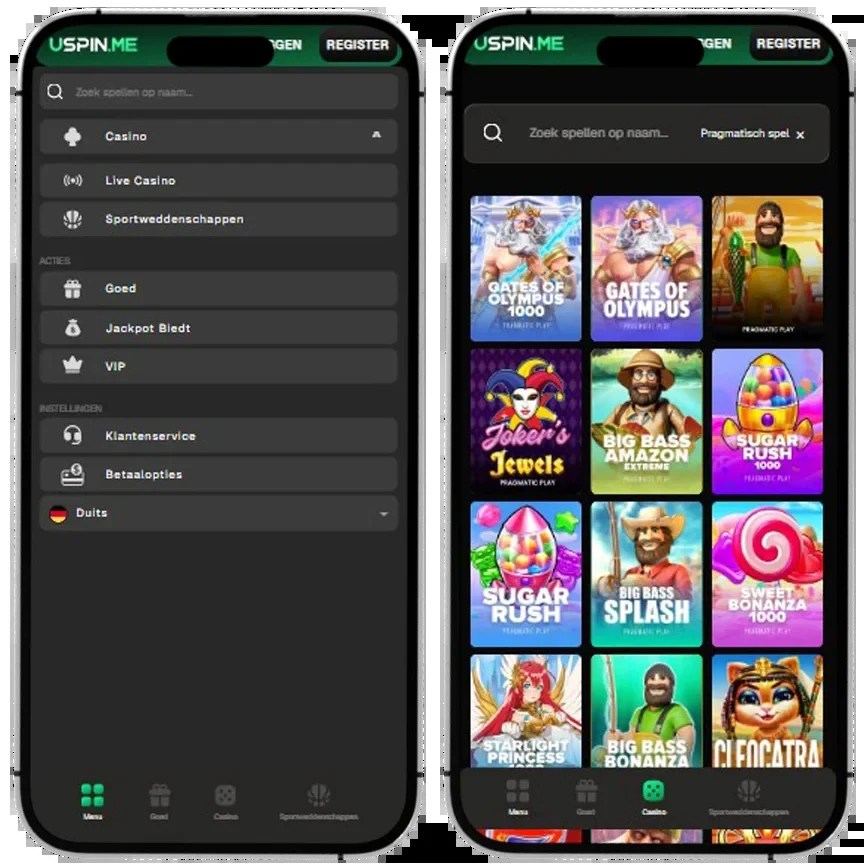
You play USpin on mobile through the browser on your smartphone or tablet. You use the same account as on desktop, with access to the casino, live dealers, sportsbook and cashier.
How the USpin app works in your browser
We offer our mobile version as a website that you open directly in the browser. No download from the App Store or Google Play is needed. You open the site, log in and carry on where you left off. The interface is designed so you quickly find your favourite games again, even on a small screen.
Advantages of playing in the browser
The browser version has a few practical advantages.
- No installation of a separate app
- One account for mobile and desktop
- The same cashier, bonuses and bets on every device
- Direct access to live chat, 24/7
Features on mobile
In the mobile browser you use the same site as on desktop. That gives you access to:
- The search field to find games by name
- The Favourites, New Games, Slots, Instant Win, Crash and Table Games sections
- Live Dealer with Baccarat, Blackjack, Dice, Game Show, Poker and Roulette
- The Game Providers filter
- My Bonuses to activate bonuses
- My Bets for an overview of your bets
- The cashier for deposits and withdrawals
- The Opt In button for the jackpot and the live jackpot counters
Mobile or desktop: the differences
Mobile and desktop work with the same site and the same account. The only practical difference is in uploading documents.
| Item | Mobile | Desktop |
|---|---|---|
| Access | Browser | Browser |
| Account | Same account | Same account |
| Activating bonuses | Via My Bonuses | Via My Bonuses |
| Deposits and withdrawals | Via the cashier | Via the cashier |
| Uploading documents | Not on every device | Via My Account |
| Support | Live chat and email, 24/7 | Live chat and email, 24/7 |
Shortcut on your home screen
Want to open USpin with one tap? Then put a shortcut to the site on your home screen. You do that through your browser; it isn't a separate app.
Android (Chrome)
- Open Chrome and go to the USpin site.
- Tap the three-dot menu at the top right.
- Choose Add to Home screen.
- Confirm the name and tap Add.
- From now on, open the site via the icon.
iPhone and iPad (Safari)
- Open Safari and go to the USpin site.
- Tap the share button at the bottom.
- Choose Add to Home Screen.
- Tap Add.
- From now on, open the site via the icon.
Paying from your phone
For deposits and withdrawals you use the cashier in your account. Several payment services have their own app, which is handy on mobile.
| Method | Mobile use |
|---|---|
| MuchBetter | App with four-digit PIN and biometrics (Face ID or fingerprint) |
| Skrill | App for Android and iOS, with a budgeting tool |
| Neteller | App for Android and iOS, optionally with a physical card |
| Instant Banking | Amount is credited instantly |
| Crypto | ETH and USDT via ERC-20 or TRC-20 |
We charge no fees of our own for deposits and withdrawals. Minimum amounts and all methods are on the payments page.
Games on mobile
Via the mobile browser you open the same lobby as on desktop. You have access to more than 6,700 slots, live dealer tables, table games, Instant Win, Crash and the sportsbook. Use the search field or the provider filter to get to a title quickly. In certain games you can chat with other players, with their own rules of conduct.
Security on your phone
On mobile too, we protect your data with SSL encryption. All transactions are monitored under anti-money laundering rules. Before your first withdrawal you verify your account.
- Only use payment methods in your own name
- One account applies per person, household and IP address
- Don't use a VPN or IP masking
- Keep your login details to yourself
Troubleshooting
Most mobile questions can be solved in a few steps.
Uploading documents doesn't work
Not all mobile devices and operating systems support uploading verification documents. In that case, log in to the desktop version and upload your documents via My Account.
Other questions
Contact our support via live chat or at support@uspin.me. The team is available 24/7, all year round.
Frequently asked questions about mobile play
Short answers to the most common questions.
Do I need an app?
No, a mobile browser on your phone or tablet is enough.
Can I activate a bonus on mobile?
Yes, via My Bonuses, just like on desktop.
Does live chat work on mobile?
Yes, support is available 24/7 via chat and email.
Can I make a withdrawal on my phone too?
Certainly, in the cashier. For the verification beforehand you sometimes need the desktop version.
Adults only. Gambling carries financial risks: set limits and take regular breaks.